Overview
AI innovation moves fast, but standard web application firewalls cannot parse prompt context — sophisticated prompt injections and sensitive data leakage slip through unhindered. The AI Risk Assessment gives you empirical data on how your applications behave under simulated adversarial conditions, so you can validate your guardrails and confidently secure your innovation pipeline.
The toolkit sends 300 adversarial prompts against your live AI application, collects the raw responses, and prepares them for analysis by our AI Red Teaming service inside Strata Cloud Manager. The output is a report that maps vulnerabilities to OWASP, NIST, and MITRE ATLAS.
Availability
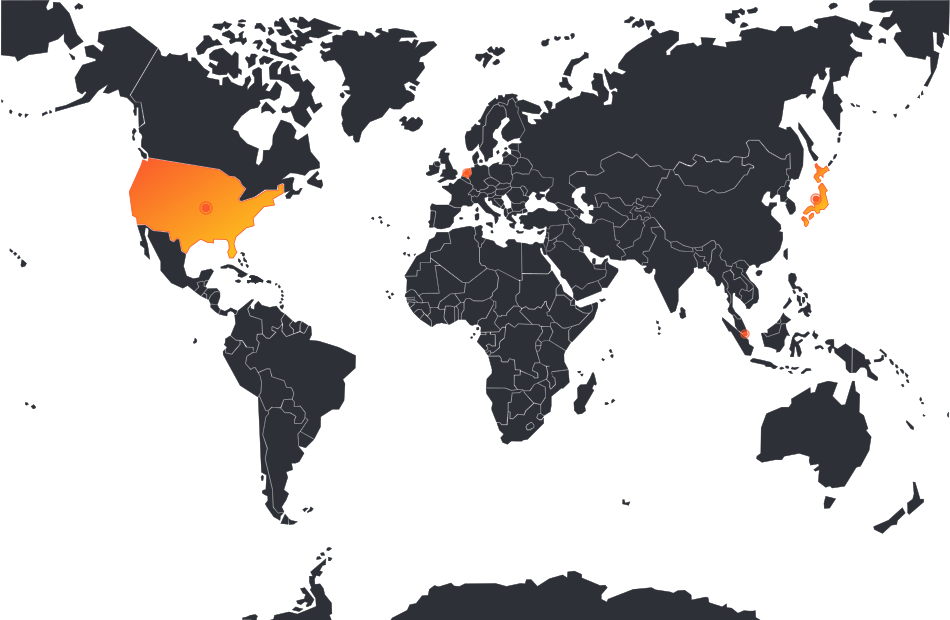
The AI Risk Assessment is currently available in four countries — one per major theater.
Where the AI Risk Assessment Is Available
Delivered today in the United States, Netherlands, Singapore, and Japan.
Key Capabilities
- Adversarial Prompt Simulation: A standardized battery of 300+ static exploits stress-tests your existing application-level controls.
- Jailbreak Vulnerability Mapping: Evaluates how reliably your application logic resists direct system-prompt overrides and behavioral jailbreaks.
- Data Leakage Auditing: Analyzes model responses to detect if your application fails to filter outbound PII, corporate secrets, or toxic outputs.
- Prisma AIRS Analysis: Raw responses are analyzed by our AI Red Teaming service in Strata Cloud Manager.
- Standards-Aligned: Findings mapped to OWASP ML Top 10, NIST AI Risk Management Framework, and MITRE ATLAS.
- Resumable Runs: The scan script automatically skips completed prompts and resumes after network or session interruptions.
Assessment Areas
Prompt Injection
- Direct prompt overrides
- Indirect / delimiter attacks
- Instruction hijacking
- Context poisoning
Jailbreak Resistance
- System-prompt override tests
- Roleplay and persona attacks
- Behavioral guardrail probes
- Non-deterministic retries
Data Leakage
- PII exfiltration in responses
- Corporate secret disclosure
- Training data extraction probes
- Toxic output detection
Framework Alignment
- OWASP ML Top 10
- NIST AI Risk Management Framework
- MITRE ATLAS
- EU AI Act readiness signals
The 4-Step Process
Setup
Install prerequisites (uv, software package), open your AI app, and capture a cURL command from the browser's Network tab.
Scan
Run the scan script to send 300 adversarial prompts through your captured cURL. Results save to results/clara-responses.csv.
Red Team
Upload the CSV to Strata Cloud Manager under Run Assessment → Red Teaming Assessment and let AIRS analyze the responses.
Review
View the analyzed results in SCM and download the PDF report — mapped to OWASP, NIST, and MITRE ATLAS.
Deliverable
- AI Red Team Brief — critical AI application security vulnerabilities
- Vulnerability discovery — prompt injection, jailbreak, data leakage findings
- Guardrail testing results against real-world AI threats
- Remediation suggestions aligned to OWASP, NIST, and MITRE ATLAS
- Strategic roadmap enabling safe, enterprise-wide AI adoption
- PDF export from Strata Cloud Manager for stakeholder sharing
Training Walkthrough
End-to-end steps for running the AI Risk Assessment demo. From setup to report in about 2–3 hours (the scan itself takes ~25 minutes at default settings).
Install uv
uv handles the Python environment automatically. Install it once for your OS:
Confirm SCM Access & Download the Package
You need:
- Access to your AI application in a browser
- Access to your Strata Cloud Manager tenant for uploading results
- The scan software package — clone from the CLARA AI Risk Assessment GitHub repo
Copy Your cURL Command
Capture the API request your browser makes when the AI app receives a message:
- Open your AI application in a browser (Chrome or Edge)
- Open Developer Tools (
F12or right-click → Inspect) - Go to the Network tab
- Send any message in the chat interface
- Find the request — usually a
POSTto/api/chator similar - Right-click the request → Copy → Copy as cURL
- Paste it into a new text file and save as
curl.txt
Run the Scan
Unzip the downloaded customer.zip into a customers folder, place curl.txt inside it, and run:
On the first run, uv automatically sets up the Python environment — a quick, one-time step. The script will parse your cURL, extract the endpoint and headers, send each of the 300 adversarial prompts, and save responses to results/clara-responses.csv.
Tune the Scan for Your App
Add flags to run_scan.py to match your app's request/response shape:
--delay 2— seconds between requests; lower for faster runs if your app allows it--request-field message— JSON path where prompts get placed (e.g.message,messages[-1].content,input)--response-field response— JSON path to extract from the response (e.g.choices[0].message.content). Not needed for streaming responses.--shared-session— use one session for all requests instead of isolated sessions--retries 5— how many times each prompt is sent (to assess non-deterministic behavior); each retry is a separate row in the output
Handle Interruptions
If the script stops (expired session, network error, etc.), refresh and resume:
- Send another message in your AI application to refresh the session
- Copy the new cURL command (same as Step 1)
- Overwrite
curl.txtwith the new command - Re-run the same
uv runcommand — completed prompts are skipped automatically
Upload Results to Strata Cloud Manager
Once the scan completes, upload the CSV to Prisma AIRS for analysis:
- Locate the output file at
results/clara-responses.csv - Log in to your SCM tenant
- Navigate to Run Assessment → Red Teaming Assessment and upload the CSV
- Wait for the AI Red Teaming service to process and analyze your results
- When processing finishes, view your results and download the PDF report
What's Next · AI Benchmarking
A companion assessment is on the CLARA roadmap — proving the efficacy of Prisma AIRS against native cloud AI safety guardrails, delivered courtesy of CyPerf (Keysight) — the same non-intrusive sandbox that powers Firewall Benchmarking today.
AI Benchmarking
Where the AI Risk Assessment on this page tests your application's guardrails with 300 adversarial prompts, AI Benchmarking will test the security layer — measuring Prisma AIRS side-by-side against native cloud AI safety controls with a standardized strike pack.
What it will measure
- Inbound prompt-injection and jailbreak blocking
- Outbound PII and sensitive-data leakage prevention
- Toxic-output and policy-violation filtering
- Side-by-side scoring vs native cloud AI guardrails
How it will be delivered
- Standardized AI strike pack in an isolated CyPerf sandbox
- Zero-risk, non-intrusive execution — same model as Firewall Benchmarking
- AI Security Validation Report with per-category blocking rates
- Board-ready evidence to justify Prisma AIRS adoption
Resources
Everything you need to run the assessment in one place — package, guide, sample deliverable, and a full demo video.
clara-ai-risk-assessment
Clone or download the scan package from the official Palo Alto Networks repository.
Open on GitHub →AI Risk Assessment Guide
Full technical steps for deploying and running the assessment end-to-end.
Download PDF →AI Red Teaming Sample Report
Preview an example of the deliverable customers receive after their scan is processed.
Download PDF →Watch the Demo
See the assessment in action from setup through report review.